
Google Search Console added a new way to see how people find a website on September 24, 2026: a multimodal search type filter, sitting in the same dropdown as Web, Text-based, Image, Video, and News. Google Search Central announced the rollout as global and immediate, and it appears in two places at once — the standard Performance report and the newer report for Generative AI features.
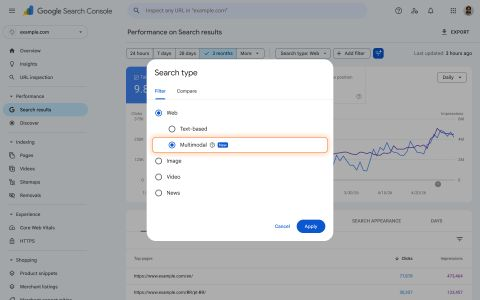
The filter is not a repackaging of the existing Image search type. It covers a specific set of query paths that all start with a picture instead of a typed phrase: Google Lens, Circle to Search on Android, image uploads directly to Google Search, and the “Search this image” option in Chrome’s right-click menu. Before this update, none of those four sources showed up anywhere in a site’s Performance data on their own line. They were folded into whatever aggregate numbers the rest of Search produced, effectively invisible to the person running the property.
The overlap with generative answers
Search Console’s report for Generative AI features already tracks how a site performs inside AI Overviews and AI Mode — impressions and clicks generated when Google’s generative systems pull from a page to build an answer. Multimodal data now runs through that same report, not just the standard Performance report. That means a site can, for the first time, see whether an image-first query — someone pointing a phone camera at a product, or circling something on screen — is the thing that got it pulled into a generated answer.
Until now, that connection had no visibility layer at all. A generative answer citing a page could have been triggered by a typed question, a voice query, or an image, and the site owner had no way to tell which. Splitting multimodal out from the rest of the traffic in the same report that tracks generative surfacing closes that gap directly, for image-driven queries specifically.
What actually changes for a site owner
Practically, the new filter turns a blind spot into a measurable line item. A site with meaningful product photography, diagrams, screenshots, or any other original visual content can now check whether that content is being found through a camera or a circle-select gesture rather than a search box, and whether that path leads into a generated answer or a standard result. Sites that have never taken image indexability seriously — missing alt text, unindexed image sitemaps, product photos with no structured data attached — now have a specific number to point to if that needs to change internally.
The mechanics of showing up well in multimodal search are not new. Clear, high-resolution images, descriptive alt text, structured data on product and article pages, and image sitemaps have been standard advice for years. What is new is that a site can now measure whether that work is paying off in a channel that was previously reported nowhere, and whether it is the specific reason a page gets surfaced when a generative system builds its answer.
What to check first
Search Console’s Performance report is the first stop — apply the new multimodal filter and see whether the number is zero, small, or already meaningful before deciding whether this needs attention. The Generative AI features report is the second stop, since that is where the overlap between image-driven queries and AI-generated answers actually shows up. Google’s own announcement points to the “Export” option in both reports for pulling the data into an external dashboard for tracking over time, which matters here because this is a metric with no historical baseline — every site is starting from today.